Sell & Accept Payments
Sell items in person or online. Add items to the cart, choose a payment method, and get a receipt — all in seconds.
Add items to the cart
Type or scan item codes to add them to the checkout. The cart shows each item's price and the total.
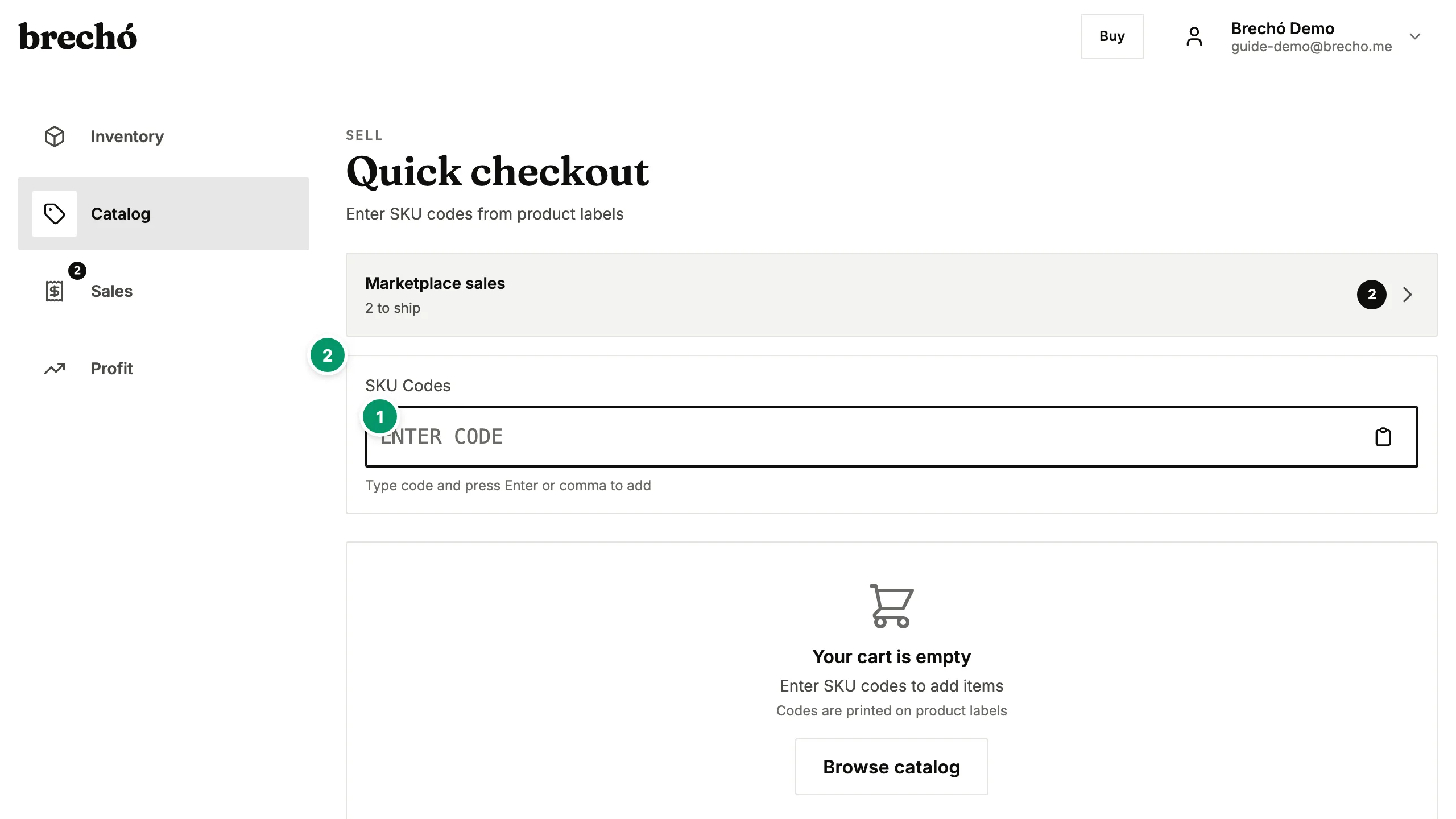
- 1 Add items to the cart
- 2 Choose a payment method
Choose a payment method
Accept PIX (instant bank transfer), credit/debit cards via Stripe, or use a POS terminal (MercadoPago or Cielo).
Confirm payment and get a receipt
Once payment is confirmed, the item is automatically marked as sold. You get a digital receipt to share with the customer.
Frequently Asked Questions
Which payment methods are supported?
PIX (Brazil), credit/debit cards via Stripe (global), and POS terminals from MercadoPago and Cielo (Brazil).
Can I sell via WhatsApp?
Yes — create a payment link from the Sell page and share it directly via WhatsApp. The customer pays online and you get notified.
Is the profit calculated automatically?
Yes. When you sell an item, brecho.me subtracts the cost (from the original order) from the sale price to show your actual profit.
Can I change the sale price at checkout to apply a discount?
Yes. At the POS checkout screen you can edit the price of any item before confirming payment — useful for negotiated prices, end-of-day discounts, or bundle deals. The original landed cost stays unchanged, so your profit updates automatically to reflect the actual sale price. The system records the final price paid, not the original listed price.
What payment options work for in-person selling at fairs or markets?
For selling at fairs, markets, or pop-up events you can accept PIX via QR code shown on your phone, card via a connected MercadoPago or Cielo terminal, or cash recorded manually. Payment links also work for in-person selling — share the link via WhatsApp and the buyer pays on their own device. Configure your preferred payment methods in Settings before the event.
Can I send a digital receipt to my buyer after a secondhand sale?
Yes. After completing a sale, brecho.me generates a digital receipt automatically. On the completed sale screen, enter the buyer's email and tap Send Receipt to deliver a payment confirmation by email. For POS terminal sales, the terminal prints a receipt if your hardware supports it. Payment links generate an automatic confirmation email sent to the buyer when payment clears — no manual step needed. Every transaction is saved in your sell history with date, items, payment method, and final price.
How do I process a PIX payment for a buyer standing in front of me?
From the Sell page, add items to the cart and select PIX as the payment method. brecho.me generates a QR code you display on screen — the buyer scans it with their banking app and payment settles in seconds. The sale records automatically when the PIX confirmation arrives, items are marked sold, and profit updates in real time against each item's landed cost. For high-traffic selling events, keep brecho.me open on your phone or tablet and confirm each QR payment before moving to the next buyer.
How do I record a cash sale without using any payment integration?
Cash sales are fully supported without any connected payment provider. In the Sell page, add items to the cart and select Cash as the payment method. Confirm the sale and brecho.me records the transaction, marks the items as sold, and calculates profit against their landed cost — all without touching Stripe, PIX, or any card terminal. Cash sales appear in your Analyze dashboard alongside all other sales and are included in revenue and profit totals. This is ideal for market stalls, pop-up events, or any situation where buyers pay with physical cash.
What happens if a buyer wants to return an item sold in person?
For in-person cash and POS terminal sales, returns are handled directly between you and the buyer — brecho.me records the sale but does not process refunds automatically for in-person payments. If you agree to a return, open the item in inventory, reset its status to In Stock, and update your records manually. For payment link sales refunded through Stripe, the refund is processed by Stripe and brecho.me updates the sale status automatically. Marketplace escrow sales follow the escrow dispute process — contact brecho.me support to open a case. Setting a clear return policy and communicating it before in-person payments reduces disputes and helps buyers purchase with confidence.
Can I accept partial payments or installments for high-value secondhand items?
Yes. Use payment links to split a sale into a deposit and a balance payment. Create the first payment link for the deposit amount — when the buyer pays, you see it confirmed in your dashboard. Hold the item in inventory and generate a second payment link for the balance when you agree to release it. Items stay in your inventory until you mark them sold manually or the balance link is paid. This approach works well at fairs and pop-up events: take a deposit on the day via WhatsApp, then collect the balance on collection or delivery. Card, PIX, and SEPA are all accepted on each link independently, so buyers can use whichever method suits them for each payment.
Can I issue a refund or cancel a payment made through a brecho.me payment link?
Yes, for payment link sales made by card or SEPA through Stripe. Open the completed sale from your Payment Links or Sell history and use the Refund option — Stripe processes the refund to the buyer's original payment method. Card refunds typically arrive within 5–10 business days and SEPA refunds within 2–3 business days. PIX payment refunds are not automated — contact brecho.me support who can initiate a reverse PIX transfer. For marketplace escrow sales, refunds are managed through the dispute process — contact brecho.me support to open a return case. After a refund, the item's status in your inventory updates automatically to In Stock so you can relist it, and profit records update to reflect the reversal.
How do I record a sale where the buyer paid partly in cash and partly by card or PIX?
Create a payment link for the digital portion (card or PIX) — when the buyer pays, it records automatically. Then mark the item as sold manually and add a cash payment note in the sale record for the remaining amount. Both amounts appear in the item's sale record and total revenue and profit are calculated correctly across both. This split-payment approach is common at markets and pop-up events where buyers combine cash with a card tap or PIX. The item is marked sold once both payments are recorded, preventing it from appearing in further payment links or listings.
Can I hold an item for a buyer and send them a payment link to pay at their own convenience?
Yes. Mark the item as Reserved in your inventory so it is not sold to someone else, then create a payment link for the agreed amount. Send the link to the buyer via WhatsApp, Instagram DM, or email — they pay when ready without needing an account. The link shows item details and accepts card, PIX, or SEPA depending on your payment settings. You set the expiry date on the link so it closes automatically if the buyer does not pay in time, releasing the reservation. When the buyer pays, the item status updates to Sold and profit is recorded. This workflow is common for buyers who want a piece but need a day or two to transfer funds.
What do I do if a buyer claims to have sent a PIX payment but it has not arrived and the payment link still shows 'viewed'?
A PIX payment that does not arrive is almost always one of three situations: the buyer sent to the wrong key, the amount did not match exactly, or the payment is still processing. Check your bank app first — PIX typically settles in under ten seconds in Brazil, so a payment still pending after a minute usually means it failed or went elsewhere. If the buyer shows a confirmation screenshot, ask them to share the End-to-End Transaction ID (E2EID) from their bank app — this is the official reference number your bank can use to locate the transfer. For in-person sales at a fair, ask the buyer to retry or pay by card while you verify later. For payment link sales, the status in brecho.me only updates to 'paid' when confirmed settlement arrives — if it still shows 'viewed', the payment has not landed. Never mark an item as sold or hand over goods until the brecho.me payment status shows paid.
Can I run brecho.me on two devices at once — for example, a tablet for sales and a phone for stock — using the same account?
Yes. Log in to the same brecho.me account on as many devices as you need — each device sees the same inventory, sales, and payment link status in real time. A sale confirmed on the tablet removes the item from stock on the phone instantly. This setup works well at market fairs: run the Sell page on a tablet for quick checkout while using your phone to check stock, create payment links, or share products via WhatsApp. There is no device limit per account and no extra configuration needed — just open brecho.me in a browser or the app on each device and log in. For team use at a fair, a helper can take payments on one device while you manage incoming stock on another without any sync delay.
Ready to try it?
Start managing your secondhand shop today. No credit card required.