Payment Links
Create a payment link and share it anywhere — WhatsApp, Instagram, email. Your customer pays online, you get notified instantly.
Create a payment link
Select items from your inventory and generate a payment link. Set the total amount and choose which payment methods to accept.
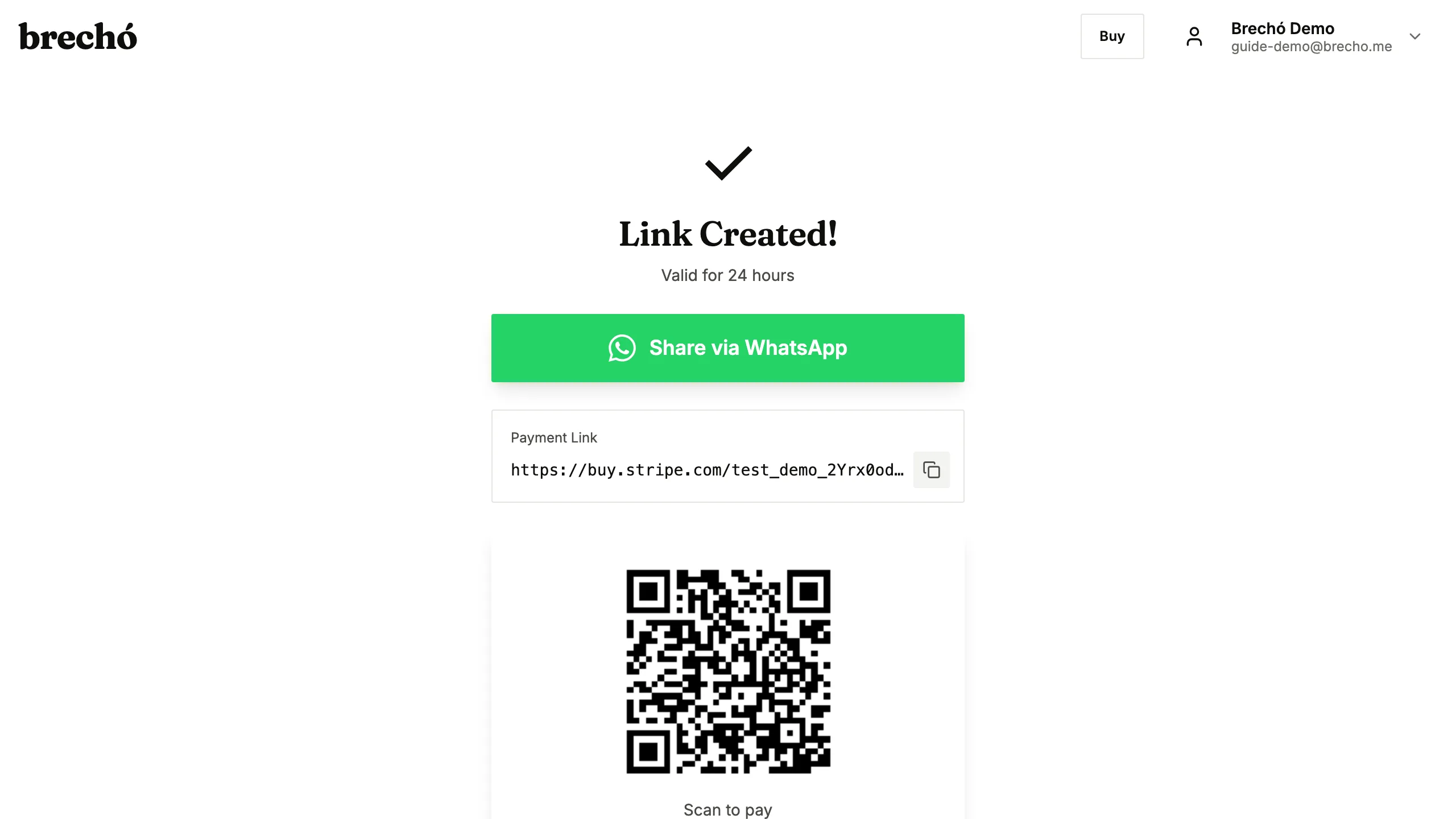
Share via WhatsApp or social
Copy the link or tap the WhatsApp button to send it directly to your customer. They can pay from their phone.
Track payment status
See when your customer opens the link and completes payment. Items are automatically marked as sold when paid.
Frequently Asked Questions
Can my customer pay with PIX?
Yes — payment links support PIX and card payments. Your customer chooses their preferred method.
Do payment links expire?
Payment links remain active until the items are sold or you manually cancel them.
Can I include items from multiple supplier orders in one payment link?
Yes. Select any combination of inventory items — regardless of which purchase order they came from — to include in a single payment link. The total updates automatically as you add items. Once paid, all included pieces are marked as sold and profit is recorded per item against each one's original landed cost, including the allocated shipping and import fees.
Can I see when a buyer opens my payment link?
Yes. From the Payment Links section, each link shows its current status: pending, viewed, and paid. You can see when a buyer first opened the link and how long ago. If a link was viewed but not paid, send a follow-up via WhatsApp using the same link. Links stay active until the items are sold or you cancel them manually — there is no automatic expiry date.
Do buyers need to create an account to pay via a payment link?
No. Buyers can pay through any preloved.supply payment link without creating an account. They open the link on their phone, choose their payment method — card or PIX — and pay in seconds. No registration, no password, no app download required. This makes payment links ideal for selling to buyers on WhatsApp, Instagram, or at in-person events where signup would slow the sale.
Can I create a payment link for a custom amount without selecting specific inventory items?
Yes. Use the custom amount option when creating a payment link — enter any amount and a brief description, then share the link. The buyer pays by card or PIX without items being deducted from your inventory automatically. This works well for deposits, service charges, or custom orders where the final price is negotiated. For standard secondhand sales, linking specific inventory items is recommended so profit is tracked automatically per piece against its landed cost and marked as sold when payment clears.
Can I collect a deposit upfront and a balance payment later for a high-value secondhand item?
Yes. Create two separate payment links for the same item: the first for the deposit amount, the second for the balance. Share the deposit link immediately — when the buyer pays, you see it confirmed in your Payment Links dashboard. Generate and share the balance link after delivery or when agreed. For reservations at fairs or pop-up events, a deposit link via WhatsApp locks the item before the event. Items stay in your inventory until you mark them sold manually or the balance payment link is paid.
Can European buyers pay via SEPA bank transfer through a preloved.supply payment link?
Yes. When Stripe is connected as your payment provider, buyers in Europe can pay via SEPA Direct Debit on any preloved.supply payment link — no PIX required. SEPA payments are available for buyers with a European bank account and settle within one to two business days. Your payment link shows both card and SEPA options automatically when accessed from a European browser. SEPA transactions appear in your Payment Links dashboard with a SEPA label alongside card and PIX sales, with profit recorded per item against its landed cost the same as any other payment method.
How do I follow up with a buyer who viewed my payment link but didn't pay?
When a buyer opens your payment link but does not complete payment, the link shows a "viewed" status in your Payment Links dashboard. Send a follow-up via WhatsApp using the same link — you can see exactly when they last opened it to time your message well. A friendly reminder sent within 24 hours of the first view has the highest conversion rate. Mention that the item is still available, offer to answer questions, or note if demand is high. Links stay active until the item sells or you cancel them — no need to generate a new link for a follow-up. For high-value secondhand items, including a brief description or photo in your follow-up message reminds the buyer why they were interested.
Can I share a payment link with multiple buyers and have the first to pay claim the item?
Yes. A preloved.supply payment link for a specific inventory item can be shared with multiple buyers at the same time — the first to complete payment claims the item, and the link shows as sold to anyone who opens it afterwards. Share the link in a WhatsApp group, Instagram story, or broadcast message and let buyers act fast. Once payment clears, the item is marked as sold in your inventory automatically and no further payments are accepted through that link. For even wider reach, combine a payment link share with a marketplace listing — buyers finding you organically on the marketplace and direct buyers from your social channels both have a clear path to purchase the same piece.
Can I generate a QR code from a payment link to accept in-person payments without a POS terminal?
Yes. Every preloved.supply payment link has a built-in QR code. On the payment link detail page, tap the QR Code button and show the screen to the buyer — they scan it with their phone's camera or banking app and pay by PIX instantly. This works well at markets, fairs, and pop-up events where a physical terminal is not available. For card payments at in-person events, card payment links work the same way — the buyer scans the QR and completes payment on their own device. No terminal rental or extra account needed. PIX QR payments settle in seconds, so you confirm the sale and move to the next customer without waiting. The sale records automatically in your inventory and profit updates in real time.
Can I send a payment link in EUR for a European buyer or BRL for a Brazilian buyer?
Yes. The currency of a payment link is set by your connected payment provider. Stripe payment links charge in EUR (or your configured Stripe currency) for European buyers paying by card or SEPA. MercadoPago payment links charge in BRL for Brazilian buyers. If you sell to both audiences, connect both providers in Settings — preloved.supply routes buyers to the correct payment page based on which provider generated the link. For most sellers, creating the link from the correct provider for your buyer's currency is all that is needed — no manual currency selection required.
Can I use separate payment links for different sales channels to track which channel brings the most buyers?
Yes. Create one payment link per channel — one for your WhatsApp broadcast, one for your Instagram story, one for your TikTok post. Give each link a label in the notes field to identify the channel. When buyers pay, each sale is recorded with the link it came through, so you can see in your Payment Links history which link generated the most paid orders. For the same item across multiple channels, use the 'share first to pay' feature: the item sells on the first completed payment and the other links close automatically. Over time, comparing conversion rates per channel shows where your buyers actually come from and helps you focus promotion on the channel with the lowest cost per sale.
Can buyers pay in installments — 'parcelado' — through a preloved.supply payment link, for example 3× without interest?
Installment options depend on the payment provider connected to your account. MercadoPago supports parcelado up to 12× for Brazilian buyers — when enabled in your MercadoPago account settings, buyers see installment options on the payment screen and you receive the full amount on the agreed payout schedule. To offer parcelado, configure installment settings in your MercadoPago dashboard — the options you enable there appear automatically on preloved.supply payment links generated with MercadoPago. MercadoPago charges a fee for installments — check your rate table before offering 3× or more and factor that fee into your price so it does not reduce your margin. For secondhand items above R$200 — coats, shoes, handbags, or vintage designer pieces — offering 3× sem juros can significantly increase conversion, especially when the buyer is comparing your secondhand price against the cost of buying new.
Can I set an expiry time on a payment link for a flash sale — for example, a 24-hour price that closes automatically?
You cannot set a custom expiry today — every link shows a standard 24-hour validity — but a flash sale still works, because of how links hold stock: creating a payment link reserves the piece for that buyer, so nobody else can buy it out from under them while your offer stands. Run the sale by sharing the link for exactly the window you announce — '24-hour price', '2 hours, fair special' — and when your window ends, cancel the link yourself from its page. Cancelling deactivates the payment page immediately and puts the piece straight back on the shelf; the reservation is not released automatically, so ending the sale is your move, not a timer's. State the deadline plainly in your WhatsApp broadcast or story caption; the urgency comes from your announced window, and the reservation guarantees the price you promised is the price that settles.
Ready to try it?
Start managing your secondhand shop today. No credit card required.